
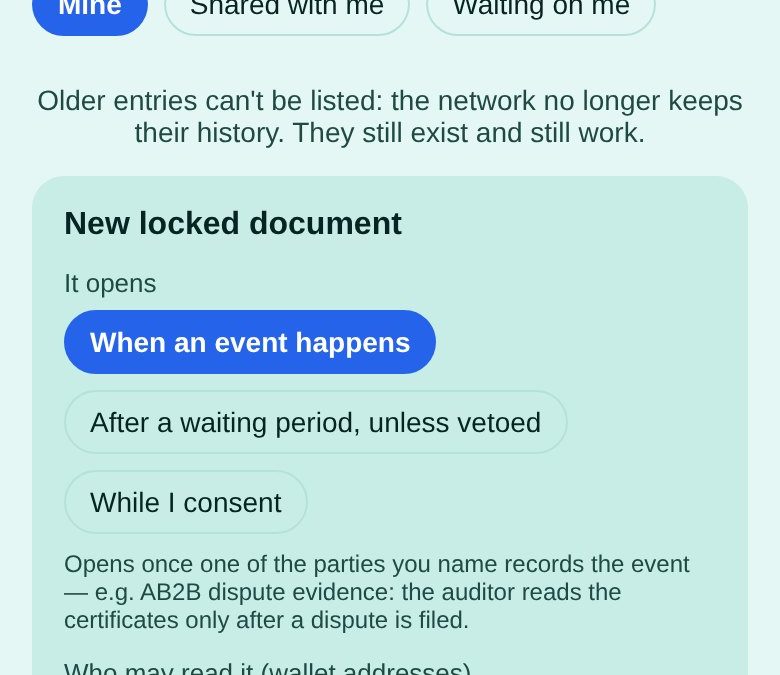
Two businesses agree on a delivery. The supplier has certificates — test reports, origin papers — that the buyer’s auditor should see if something goes wrong, and nobody should see before. Usually that means a lawyer’s safe or a shared drive with a password everyone forgets. Here is the same arrangement with Locked documents in the AB2BC wallet.
What you set up
- It opens: When an event happens.
- Who may read it: the auditor’s wallet address.
- Who may record the event: the buyer and the supplier — either can file the dispute.
- Document: the certificates (a file up to 512 KB, or a text note).
Step by step
- In the Ace wallet, open Portals → 🏛️ Portals → 💼 For businesses → Locked documents.
- Tap + New locked document and choose When an event happens.
- Paste the auditor’s address under Who may read it, and both parties’ addresses under Who may record the event.
- Give the document a title — the auditor sees the title before it opens — add the file, and tap Create and seal. The file is encrypted on your device before it leaves.
- If a dispute comes up, either party taps Record the event. From then on the auditor finds the certificates under Shared with me and can open them.
Until then, the auditor’s wallet says why it is still closed: the event has not been recorded yet.
What this does not do
Today one AB2BC key server keeps each document key and releases it only when the chain says the document is open. Splitting keys across several independent servers is built and will be switched on as independent servers join. A locked document is a record, not legal advice or notarisation.
More walkthroughs — confidential invoices and audit samples — are on the AB2BC Documents page.
Good to know: AB2BC runs on test networks today, so payments and rewards are for trying things out. Rewards are not investments, not income and not refunds; their value can go down as well as up.